Menus and Panels
Top Menu
The top menu provides standard shell actions plus Abacus-specific entry points.
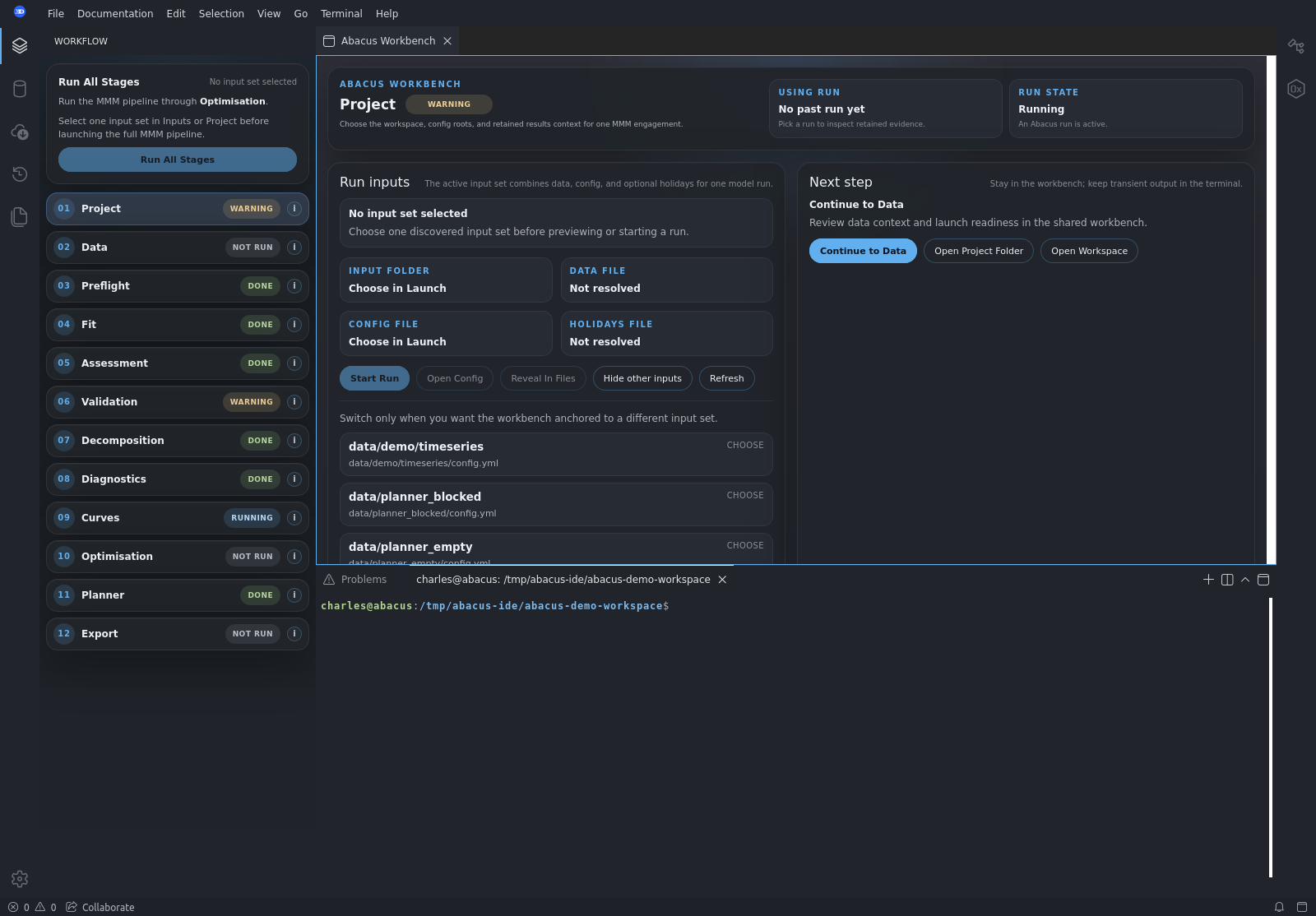
Key product-facing menus include:
FileDocumentationEditSelectionViewGoTerminalHelp
The Documentation menu links to:
- Abacus MMM Library docs
- Abacus IDE docs
Left Activity Rail
The left activity rail exposes the primary product surfaces:
WorkflowInputsRunsDemos, when available
These are product panels, not generic IDE chrome.
Workflow Spine
Inside the main workbench, the workflow spine is the primary navigation model.
It shows:
- stage order
- stage status
- guided movement through the MMM lifecycle
Main Workbench
The main workbench area hosts the active stage view and native planner tabs.
This is the primary product surface for:
- stage-specific evidence
- actions and next-step guidance
- planner tabs and comparison views
Bottom Terminal
The bottom terminal is a transient runtime surface.
Use it for:
- live runner output
- Python console access
- temporary inspection during a run
Retained workflow truth should still come from manifests and artifacts surfaced in the workbench, not from terminal scrollback alone.